 RoomTour
Floor plan to 3D: free, AI and phone options compared
· 4 min read
A 2D floor plan makes sense to people who read plans for a living. A 3D floor plan makes sense to everyone: at a glance you see which room opens onto which, where the light comes in and how much space there really is. That is why more and more listings include one.
You don't need an architect to get one. If you already have the plan as a PDF or an image, there are four ways to turn it into 3D, from free with some patience to automatic with AI.
The four options at a glance
| Option | Cost | Effort | True to scale | Best for |
|---|---|---|---|---|
| 3D design software | Free or cheap | An afternoon | Yes, if you measure well | Renovations and furnishing |
| AI image generator | Low | Minutes | Not guaranteed | An inspiration image |
| Phone scanning | Paid app, iPhone with LiDAR | One visit | Yes, approximately | Measuring a home with no plan |
| 3D model from the plan | Included in some tour apps | Minutes | Yes, the plan's | Listings and virtual viewings |
1. Redraw it in 3D design software
The classic route. Tools such as Sweet Home 3D (free and open source), Planner 5D and Floorplanner let you draw walls on a grid and see the home in 3D straight away. Most of them let you load your plan image as a background and trace over it.
The upside is full control, and you can add furniture to plan a renovation. The downside is that you draw every wall yourself, and one wrong measurement throws the rest off. Allow an afternoon for a three-bedroom flat.
2. Ask an AI to do it
It pays to separate two kinds of tool here, because the results are very different.
Image generators. Give them the plan and they return a 3D render, often isometric, with wooden floors, sofas and plants. They look great, but they invent: furniture that isn't there, materials that aren't the property's and sometimes a room more or less. Fine for inspiration, not for showing a real home.
Plan readers. They analyse the plan image, detect walls, doors and windows, and build a 3D model to scale. Services aimed at new builds, such as Homistry, turn builder plans into a 3D home you can walk through. The model looks plainer, but the layout is the plan's.
3. Scan it with your phone
No plan at all? Scan the home instead. On an iPhone Pro with LiDAR, apps such as magicplan or Polycam measure the walls as you walk and produce a plan and a 3D model. Without LiDAR there are camera-based apps, with a larger margin of error. We compare them in the best floor plan app for iPhone.
4. A 3D model from the plan, next to a 360° tour
For a listing, what helps buyers most is seeing the layout and being able to step into each room. That is why some virtual tour apps combine both: the plan becomes a 3D model, and tapping a room opens its 360° photo.
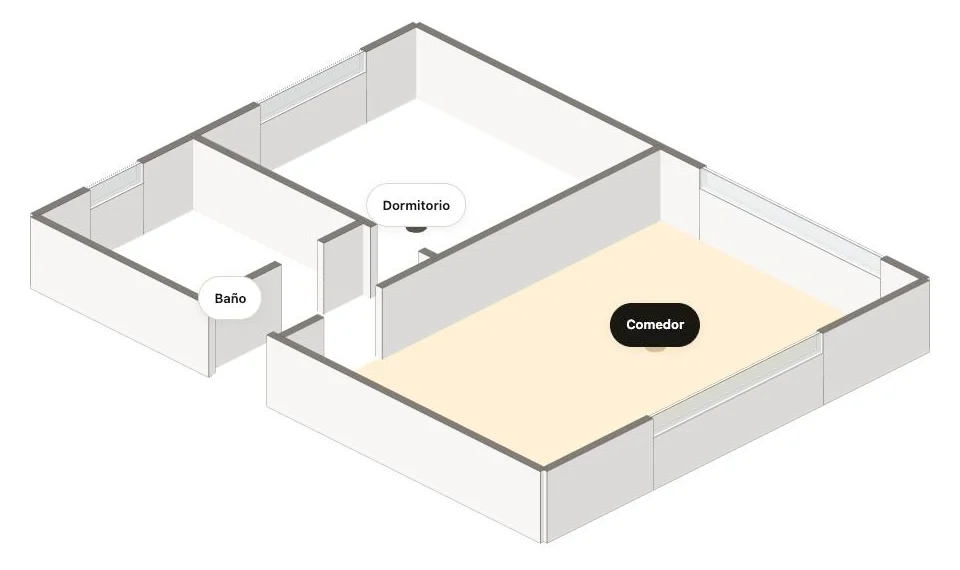
This is how RoomTour will do it: you upload the plan you already have, AI traces the walls, doors and windows, you check the result, and the tour shows the model with the room you are in lit up. You can try it on the example property.
How to choose
- For a renovation or furnishing: 3D design software. You need measurements and furniture, and the drawing time pays off.
- For an inspiration image on social media: an AI generator, knowing that it doesn't show the real home.
- For measuring a home with no plan: a phone scan.
- For selling or letting: a model that is faithful to the layout, ideally with real 360° photos of every room.
What to check before you publish a 3D floor plan
- Scale. Compare one wall you know (the living room, say) with its real length. If it doesn't match, nothing else will.
- Doors. They are what automatic models get wrong most often, and what matters most for understanding how you move through the home.
- The "approximate" label. No plan made with a phone or with AI replaces one signed by a surveyor. Say so in the listing.
- Nothing invented. If the render shows furniture or finishes the home doesn't have, label it as an illustration.
Frequently asked questions
How do I turn a floor plan into 3D for free?
The most complete free route is to redraw the plan in design software such as Sweet Home 3D, which is free and open source and builds the 3D view as you place walls. Load your plan image as a background and trace over it. Expect an afternoon for a typical flat.
Can AI convert a floor plan to 3D?
Yes, in two different ways. Image generators turn a plan into an attractive render but invent finishes, furniture and sometimes the scale. Plan readers detect walls, doors and windows and build a model to scale; they look plainer but keep the real layout, which is what matters for a listing.
What is an isometric 3D floor plan?
A 3D view without perspective: parallel lines stay parallel, like a technical drawing. The walls are usually cut at half height so every room is visible at once, which is why it is also called a dollhouse view.
Can I use a 3D floor plan in a property listing?
Yes, as long as it shows the real layout and is labelled as approximate. If the image shows furniture or finishes the property doesn't have, say it is an illustration so buyers aren't misled.