 RoomTour
Virtual walkthrough for real estate: 360° tour, dollhouse view or 3D walk?
· 2 min read
"Virtual walkthrough" covers very different things, from a few linked panoramic photos to a full model of the home you can walk around in. Before you pick a tool it helps to know what each one does, what equipment it needs and what the buyer actually sees.
The three kinds of virtual walkthrough
1. 360° tour
One panoramic photo per room, linked with arrows. The buyer looks around as if standing in the middle of each room and jumps to the next. It is what most property portals support and the easiest to make: today a phone is enough. Our step-by-step guide: how to make a virtual tour with your phone.
2. Dollhouse view
The whole home seen from outside, walls cut away so every room shows at once. It is the part of a 3D tour that does most for understanding the layout: which room opens onto which, where the kitchen sits next to the living room, which bedroom is the quiet one.
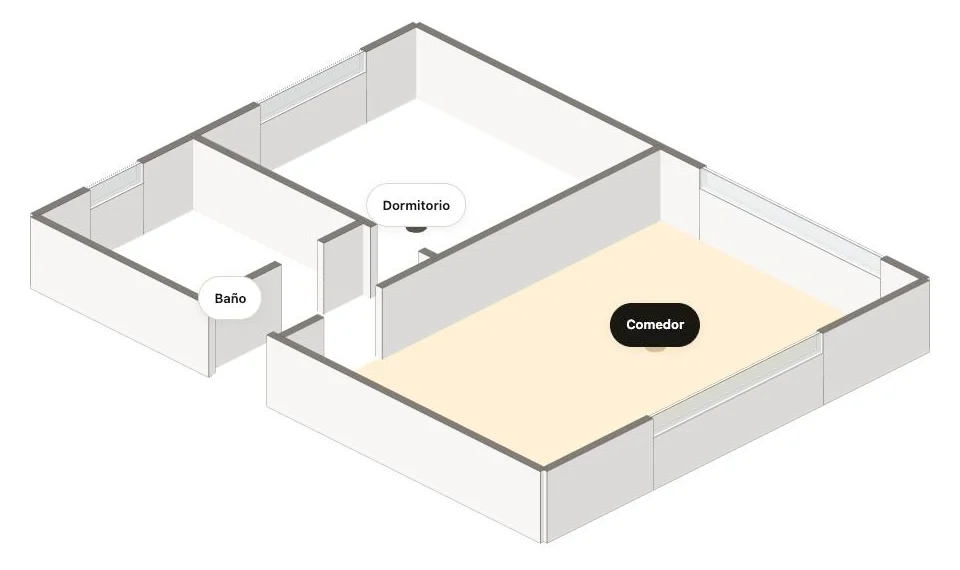
3. Walking through the model
Moving inside the model from room to room, as if you were walking through the home. In the most complete systems the model carries the real photos on its walls and floors, so you see the actual home, not a render.
What equipment you need
- A dedicated 3D scanning camera. Systems such as Matterport use their own camera or a LiDAR phone and build the full 3D model. The most polished result and the most expensive option.
- A 360° camera. Great panoramas, but on its own no dollhouse. We compare models in the best 360 camera for real estate.
- Just a phone. Some apps make the 360° tour with an iPhone and build the 3D model from the floor plan, with no scanner.
How to make a virtual walkthrough of a house, step by step
- Prepare the home. Lights on, blinds open, floors clear. The same as for listing photos.
- Capture room by room. Stand in the middle of each room and follow the app's guide. With RoomTour that is about 30 photos per room and one turn on the spot.
- Add the floor plan. If you have one, upload it: it drives the minimap and, once the 3D model is available, the model itself.
- Publish and share. Paste the link into the portal's virtual tour field, embed it on your website, or print a QR poster. See how to embed a virtual tour on your website.
Things to keep in mind
- Approximate measurements. Neither a 360° tour nor a phone-made model replaces a surveyed plan. Say so in the listing.
- Nothing invented. If you add virtual furniture or finishes the home doesn't have, label it as an illustration.
- Fast loading. Many buyers open the tour on their phone over mobile data: a light tour beats a spectacular one that never loads.
You can see all three side by side on the example property.
Frequently asked questions
What is the difference between a 360° tour and a 3D tour?
A 360° tour is a set of panoramic photos, one per room, linked together: you look around from a fixed point and jump to the next. A 3D tour adds a model of the property, so you can also see the whole layout from outside (the dollhouse view) and move between rooms inside it.
What is a dollhouse view?
A view of the whole home from above and to one side, with the walls cut away so every room is visible at once, like a doll's house. It is the quickest way to understand a layout.
How do I make a 3D tour of a house?
Either scan the home with a dedicated camera or a LiDAR phone (Matterport-style systems), or capture 360° photos of each room with a phone app and build the model from the floor plan. For a 360° tour without a model, an iPhone is enough.
Do buyers actually use virtual walkthroughs?
Mostly to filter: by the time someone books a viewing they have already walked through the home and know the layout works for them. That saves wasted viewings for the agent and the seller.