 RoomTour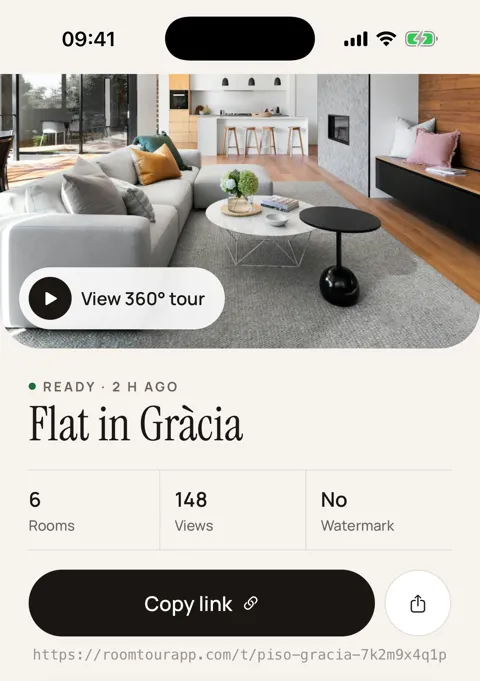
"What is the room actually like?"
It's the question that fills a small hotel's inbox in different words: will a cot fit next to the double bed, is it a shower or a bath, is the "sea view" from the bed or only if you lean over the balcony. Photos help, but a wide-angle lens flattens a room and guests know it. When they aren't sure, they book somewhere else or email you three times first.
A 360 virtual tour answers that without you writing a word: the guest looks round the room and sees where everything is. For an independent hotel, a B&B, a guest house or a country inn, the idea was never the problem. Doing it was. Hiring someone to tour every room type costs money, and every refurbishment leaves the tour out of date.
The short version: with an iPhone you can have a 360° tour of every room type and your shared spaces in a morning, and redo it when something changes. It goes on your website, in your replies to enquiries and on a QR code at reception.
How a hotel 360 tour works with your phone
RoomTour is our app. This is how a hotel uses it:
- Choose what to show. One room of each type (standard double, superior, family room, suite), the breakfast room, the terrace or pool, and the function room if you host events. Our hotel virtual tour guide has a fuller list.
- Dress each space as for photos. Beds made, curtains open, lights on, no housekeeping trolleys or luggage in sight.
- Capture on your iPhone. Stand in the middle and turn on the spot, following the target on screen: about 30 shots per space, no 360 camera or tripod. The phone stitches the panorama.
- Publish and share. Every tour gets its own roomtourapp.com/t/… link and a code to embed it in your website.
You can see the result in the example tour. It's a home rather than a hotel, but what a guest sees is the same.
What you get
- A link per tour to paste into an email, a WhatsApp message or your reply to a direct booking enquiry. Nobody has to install anything to open it.
- An embed (iframe) for your website, so the tour sits on each room type's page next to the book button.
- An A4 QR poster, in English or Spanish, for reception, the lift or the door of the function room. A couple viewing your wedding venue can take the tour home to show their family.
- An approximate floor plan of what you capture in the same tour, worked out from the phone's movement (roughly 10–20 cm out). It helps guests understand how a suite or apartment fits together; it isn't for measuring.
- View counts per tour in the app, so you know whether anyone opens what you put on your website.
- No watermark during the launch, and your tours are on the web dashboard too when you're at a computer.
Weddings, events and direct bookings
The tour earns most where people decide with the most doubt. A couple looking for a wedding venue want to see the function room, the terrace for drinks and the bridal suite before they drive out. A company booking an away day wants to check the meeting room takes a U-shape. Sending the link in your first reply saves a show-round that doesn't always convert.
For direct bookings, a tour is a reason to book on your own site: guests see the exact room type they're paying for, which an OTA listing shows in a more limited way. Our hotel virtual tour guide covers this, including what Booking.com and Google actually accept.
Limits: when something else suits you better
We'd rather say it now than have you find out:
- Large or luxury hotels. If you want a 3D dollhouse model, measurements, or a full walk-through of corridors and grounds, a professional Matterport scan or a specialist photographer gives a better result, and it's what a 5 star hotel virtual tour usually calls for. We compare the options in Matterport alternatives.
- Google and Booking.com. RoomTour doesn't upload anything to Google Maps, your Business Profile or Booking.com, and it doesn't export panoramas as files yet. For 360° photos on those platforms you need a 360 camera or a photographer.
- No integrations. There's no connection to your PMS, channel manager or booking engine. The tour is a link and an iframe that you place yourself.
- Very large spaces and outdoors. The app is built for rooms. For extensive grounds or a huge banqueting hall, try it before you rely on it.
- iPhone only. There's no Android app.
During the launch, RoomTour is free for early users.
Frequently asked questions
How do you make a virtual tour of a hotel?
Pick one room of each type plus the shared spaces that sell the stay, dress them as you would for a photo shoot and capture a 360° panorama in each. With RoomTour you do it on an iPhone: the app guides about 30 shots per space and stitches the panorama on the phone.
What is a 360 hotel room view?
A panorama of the room that guests can drag or turn their phone to look around in every direction, ceiling and floor included, so they can see where the bed, desk, window and bathroom door actually are.
Hotel virtual tour vs Matterport: which do I need?
Matterport scans build a measured 3D model with a dollhouse view, which suits large or luxury properties and event venues sold on exact dimensions. Linked 360° panoramas from a phone are enough to show guests what each room type looks like. More in Matterport alternatives.
Can I add a virtual tour to Booking.com?
Booking.com accepts 360° photos in the gallery (2:1 format), not a link to a tour. RoomTour doesn't export panoramas as files yet, so its tours go on your website, in your messages and on a QR code at reception.
Does it need an iPhone with LiDAR?
No. RoomTour works without LiDAR and without a 360 camera. It is iPhone only; there is no Android app.